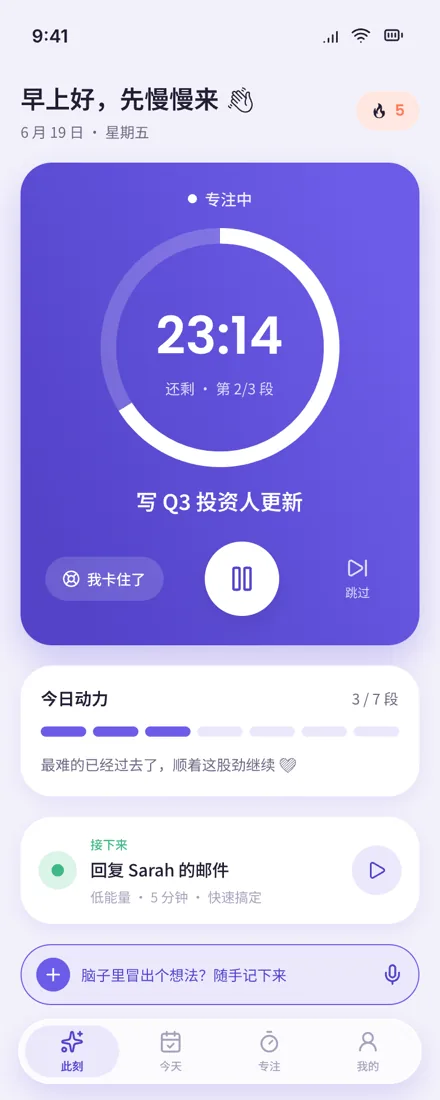
09:30FocusFlow心流
FocusFlow app
Energy nowMedium · just right
Another one done
09:30Built for different brains

Follow your nature.
Turn distraction into creativity.

FocusFlow is a free iPhone focus app for brains that struggle to start: pick your energy for the moment, choose one small task that fits it, focus with a gentle circular timer, and watch your Focus Garden grow. Data stays on your phone by default.

Platform
iPhone · iOS 17+
Price
Free · optional cosmetic purchase
Version
1.8.0 · 2026-10-15
Download on theApp StoreSee how it works
  • Free download
  • Start with one small step
  • Data stays on your phone
  1. 06:40Wake · Daylumen
  2. 09:30Focus · FocusFlow
  3. 12:10Water · PotPal
  4. 16:40Keep · Signet
  5. 19:20Go · GeoZine
DEMO

Just two minutes first

We get it

Why is starting so often the hardest step?

The things you want to do are always there — it's just that starting feels stuck every time. That's normal. What you need is a starting point so small it carries zero pressure.

  1. A task sat on your list for a whole week. Not a single word written.

  2. The more it matters, the longer you put it off — right up to the deadline.

  3. You know it only takes ten minutes, but you still can't get started.

  4. Three minutes in, your mind has already wandered somewhere else.

A different kind of brain

Why does a different brain
need a different starting point?

Your brain has its own rhythm: ideas come fast, and you can dive deep into what you love for hours. FocusFlow works with that current — making it easier to start, and easier to stay immersed.

When you're stuck, you think
"I'm just not disciplined enough"

So you push harder — and end up wanting to move even less.

What you actually need is
a smaller starting point

Break the first step down until it's too small to feel like pressure. Once you're moving, momentum takes care of the rest.

How it works

How does FocusFlow help me start?

Check how you're feeling, pick one task that fits, and focus on just that one thing. That's it.

  1. 01

    Check your energy

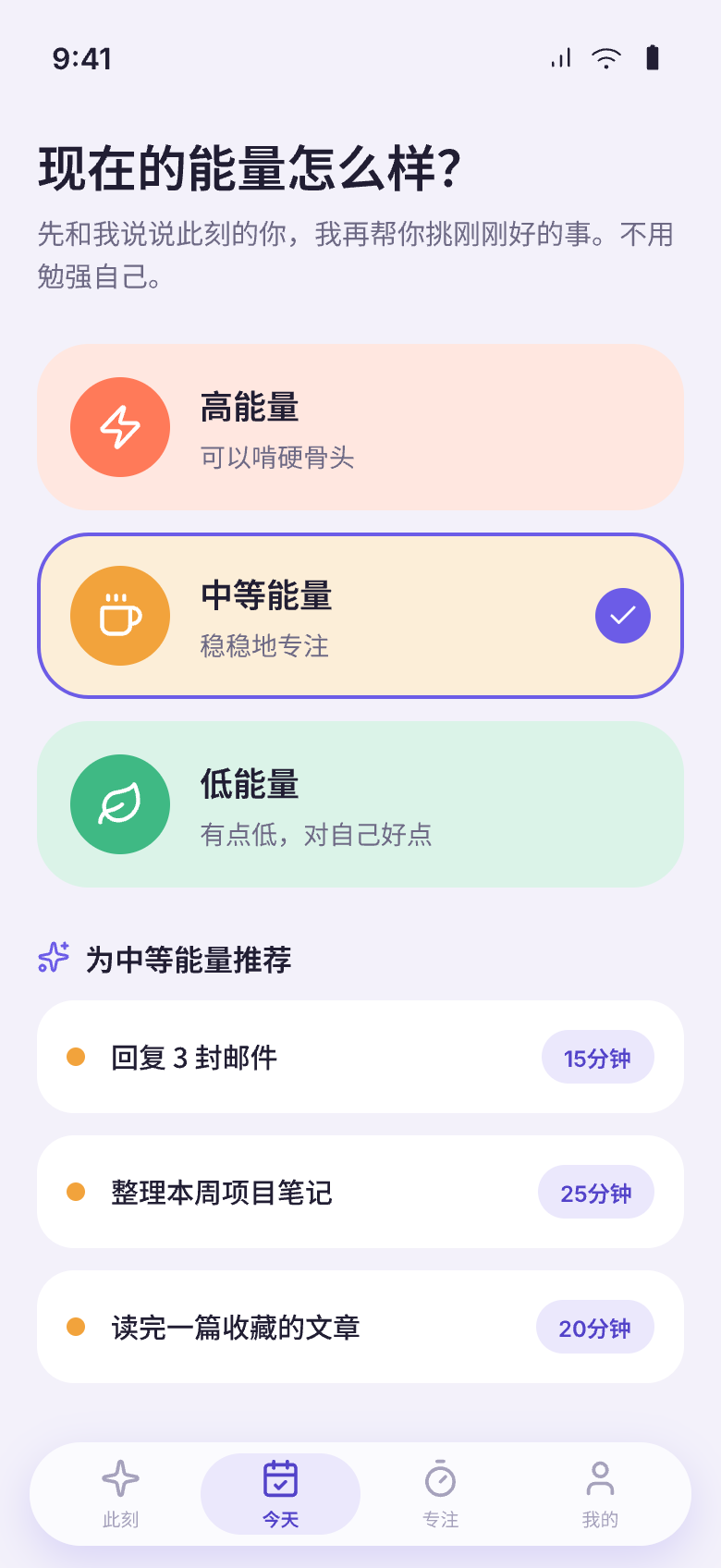
    Open the app and answer one question: is your energy high, medium, or low right now?

    HighMediumLow
    Energy check-in screen
  2. 02

    Pick a task that fits

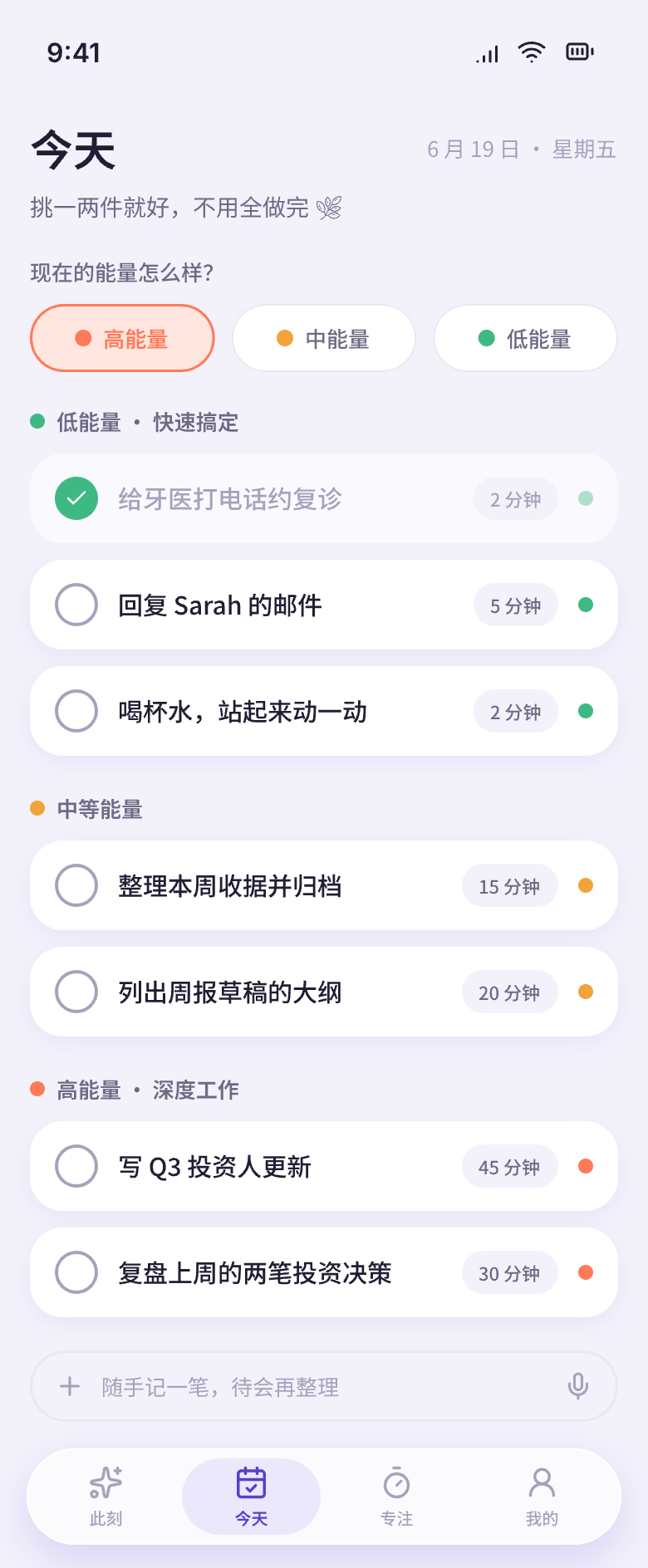
    FocusFlow matches a task to your current energy level — no need to wait until you feel "ready."

    Task list matched to energy level
  3. 03

    One thing at a time — just focus

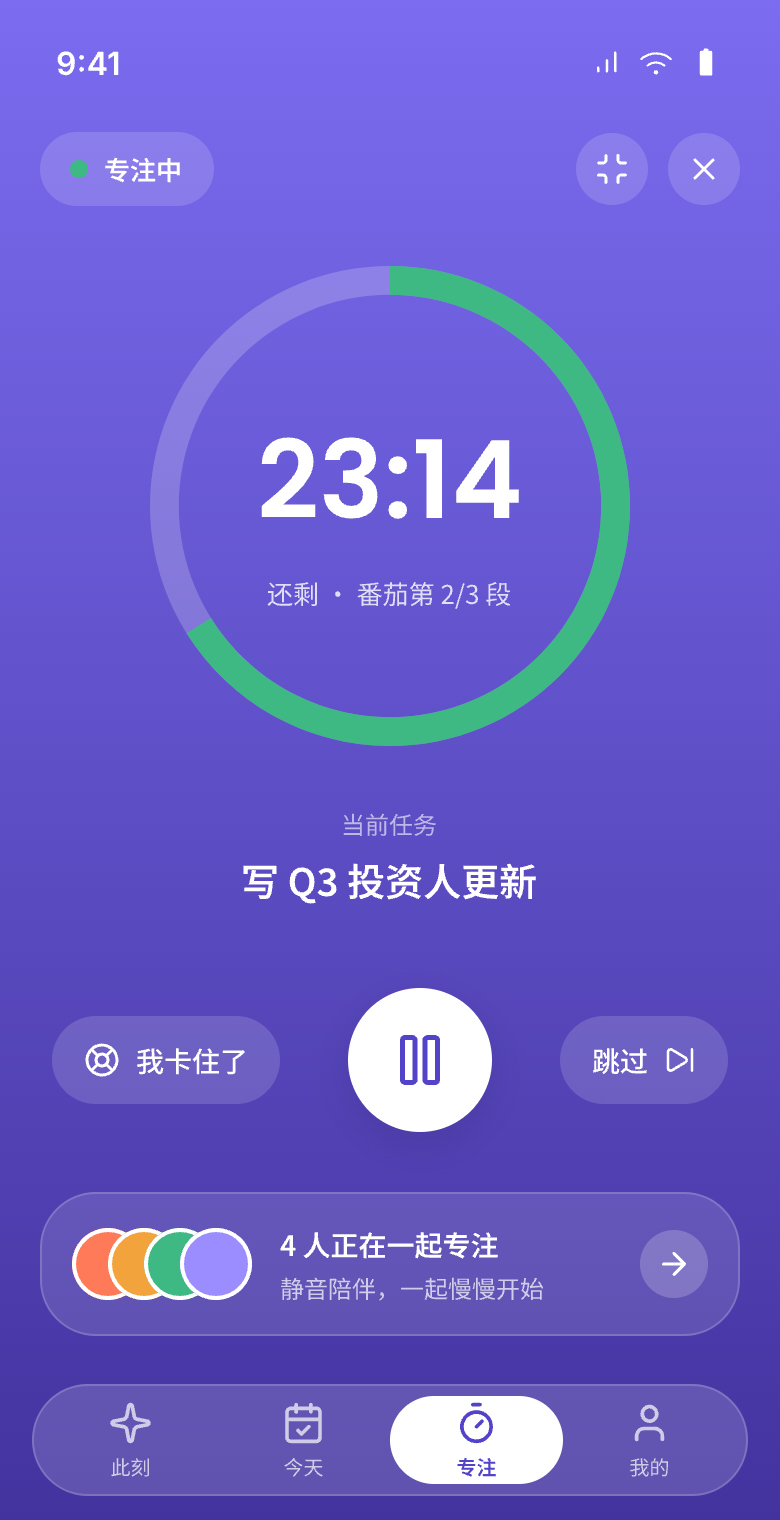
    Your screen shows only this one task and a circular timer. Just do.

    Focus session with circular timer
  4. 04

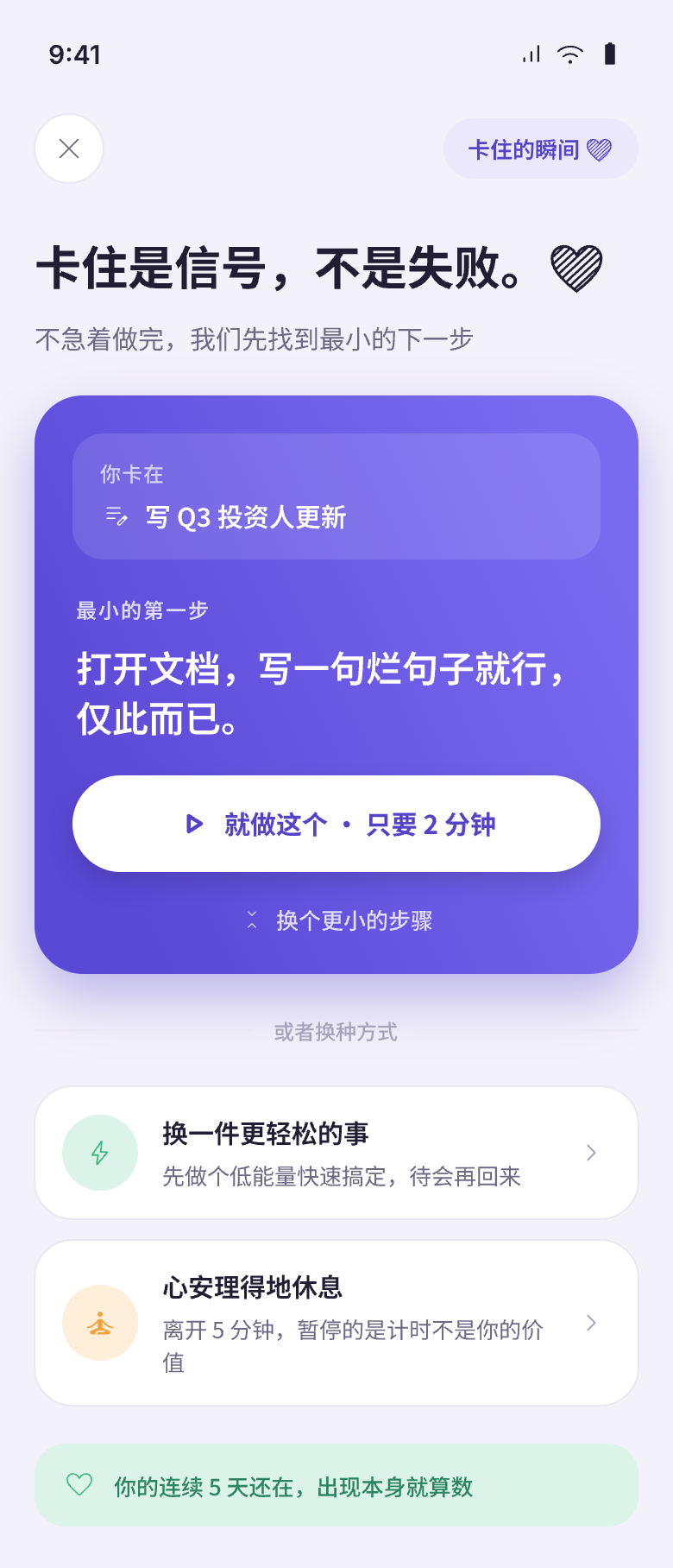
    Stuck? Break it down smaller

    Getting stuck is normal. One tap and FocusFlow offers a first step small enough to start right now, so you can keep going.

    Break down a stuck task into smaller steps
  5. 05

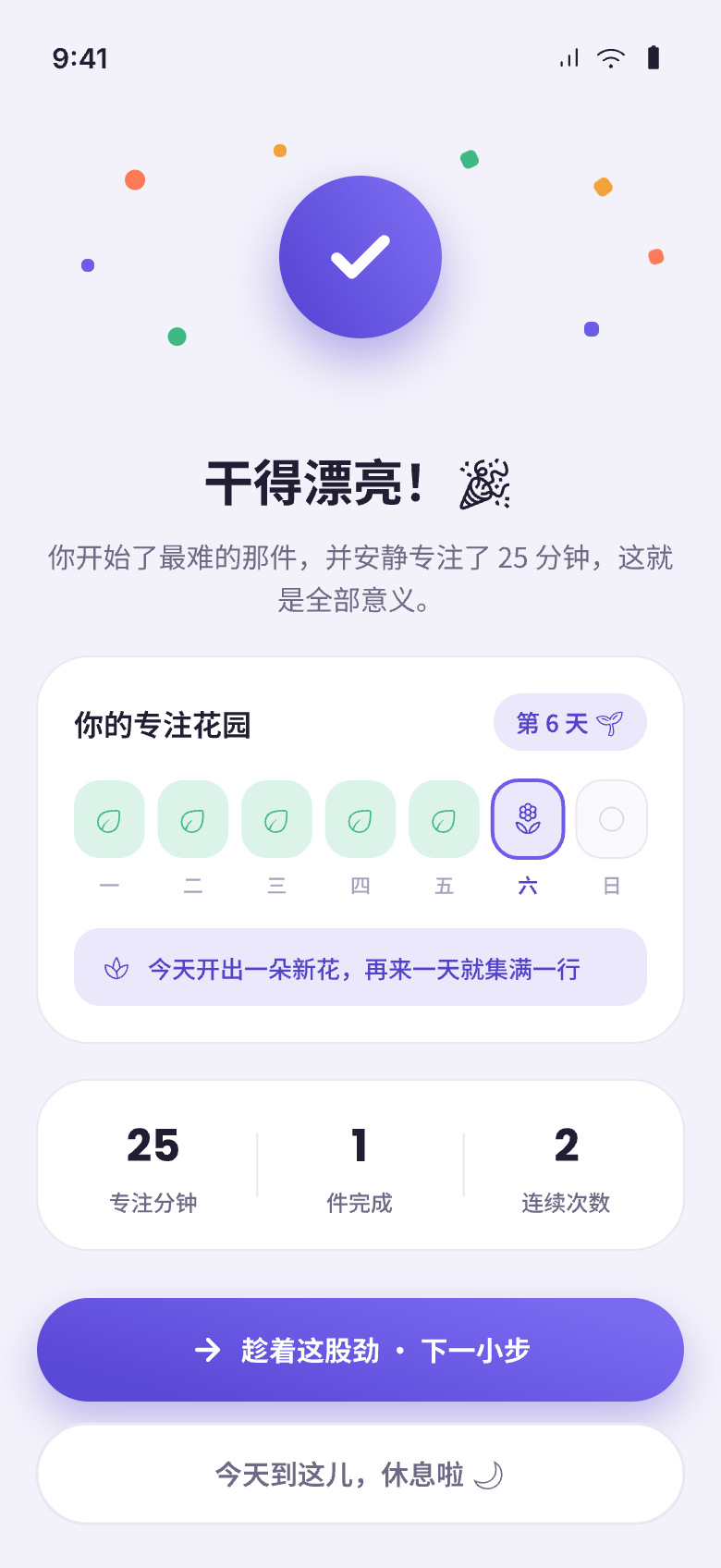
    Done? Celebrate it properly

    When you finish, celebrate. That small sense of achievement becomes fuel for your next start.

    Completion celebration screen
Features

How is FocusFlow different from a regular Pomodoro timer?

Nine small features that make starting and focusing a little easier.

Energy Matching

Pick high, medium, or low first, then decide what to do. Match tasks to who you are right now — not who you wish you were.

Follows Energy ebbs and flows like a tide

Circular Focus Timer

One task lit up at a time, with a circular timer beside it. Just immersion.

Follows Attention works best on one thing

Gentle Coaching

Never "why haven't you finished yet?" — only "let's make it a little smaller."

Follows When stuck, you need a step down, not a lecture

Quick Capture

Jot down a thought in one second without breaking your current focus.

Follows Ideas arrive fast and leave faster

Momentum Tracker

See how many times you've started — not how much is left. Every start counts.

Follows Every start deserves to be seen

Completion Celebration

Finish something? Celebrate it. That little hit of achievement becomes fuel for next time.

Follows The joy of finishing deserves to be honored

Focus Garden

Every focus session makes your garden grow a little taller. 15 growth levels based on time invested — no streaks to break, no punishment for pauses.

Follows Progress shouldn't be driven by guilt

Dynamic Island & Lock Screen

Your focus timer lives in the Dynamic Island and on the lock screen. No need to unlock or switch apps — a glance tells you how much time is left.

Follows Visible time won't be forgotten

One-Tap Start

Back Tap, Siri, Spotlight, or Control Center — jump straight into a 2-minute focus session without even opening the app.

Follows One extra step is one more chance to give up

Our story

Who makes FocusFlow?

We built FocusFlow because our own brains move fast but struggle to start. All the things we want to do are right there — we just can't seem to begin.

We tried dozens of tools, but most of them assume you've already started. What we actually needed was something to make that hardest first step a little easier.

So we made FocusFlow. If you also get stuck at "starting," we hope it helps you too.

At your own pace Start with one small step It's okay to pause

— The FocusFlow team / a bunch of easily distracted people

FAQ

Frequently asked questions

Everything spelled out clearly. No tricks, no fine print.

Do I need an ADHD diagnosis to use FocusFlow?

No. If you often find it hard to start, FocusFlow is for you — no diagnosis required.

Is my data safe?

Everything stays on your phone by default (local-first). iCloud sync is optional and only syncs between your own devices.

How is this different from a Pomodoro timer?

A Pomodoro timer helps after you've sat down. FocusFlow helps with the harder step before that — actually sitting down and starting. Focus apps for ADHD compared

Is it available now?

Yes, it's live on the App Store and free to download.

When will Android be available?

We're perfecting the iOS experience first. Android is under evaluation.

Is it free? Are there in-app purchases?

The core experience is completely free — focus timer, energy matching, quick capture, and Focus Garden growth. There's one optional cosmetic purchase (Seasonal Themes) that doesn't affect any functionality.

More questions? We'd love to hear from you.

focusflow@gatheon.com

Start with the current

Today, start at your own pace.

You don't need to become someone else. Start with the smallest step and see how far it takes you.

Download on theApp Store